
Not just regular chatbot – it’s being promoted as a “virtual companion” platform on which you can make AI characters (who can include girlfriends, boyfriends, anime characters, etc.) and communicate with them using text messages, voice clips, images…and yes, they even talk back in video! It is not a video machine, like Runway or Sora, but the videos are part of character experience.
Most of the time you’ll be:
- Generating AI characters
- Chatting in text or voice
- Requesting images and videos from your AI friend
The emotional center of Candy AI is intended to be connection – fun, flirty, romantic or even intimate – so a lot of users steer themselves into NSFW territory.
How to use Candy AI Video Generator: Step-by-step guide
Step 1 – Create the AI Girlfriend Image
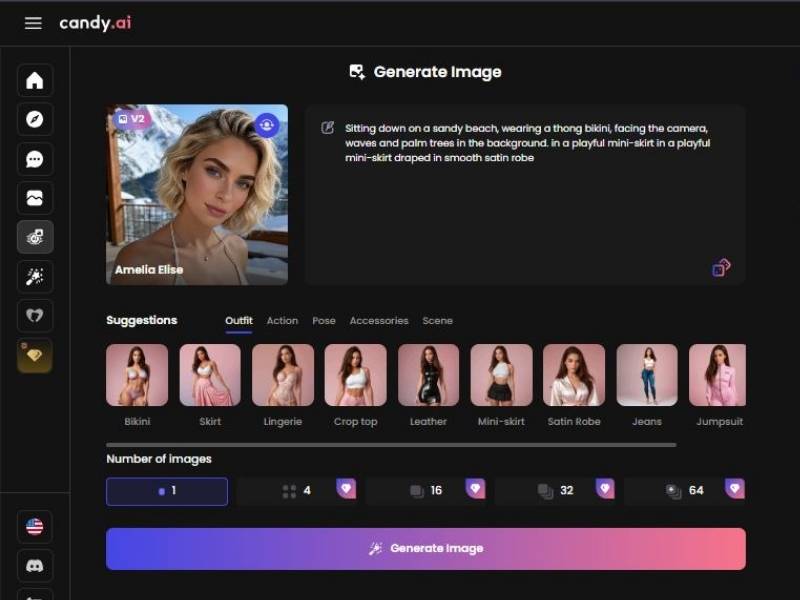
You start on the image creation screen.
What you can do here (features visible):
- Left sidebar navigation: A vertical icon menu to move between sections/tools (home and other generator areas).
- Character/Profile card: A preview tile showing the selected AI girl (portrait image), a name label, and a model/version tag (V2).
- Prompt editor (main control): A large text box where you describe:
- Appearance (hair, face vibe, overall look)
- Outfit (e.g., bikini, skirt, robe)
- Pose (sitting, standing, facing camera)
- Scene/background (beach, balcony, indoor, etc.)
- Suggestions bar with tabs:
Outfit / Action / Pose / Accessories / Scene
Each tab provides clickable visual presets (e.g., Bikini, Skirt, Lingerie, Crop top, Leather, Mini-skirt, Satin robe, Jeans, Jumpsuit) to quickly shape the prompt. - Number of images selector: Choose how many outputs to generate: 1, 4, 16, 32, 64 (some show a premium indicator).
- Generate Image button: Runs the prompt and produces the image set.
Action: Write/refine the prompt → optionally use Suggestions → choose image count → click Generate Image.
Step 2 – Choose a Generated Image for Video
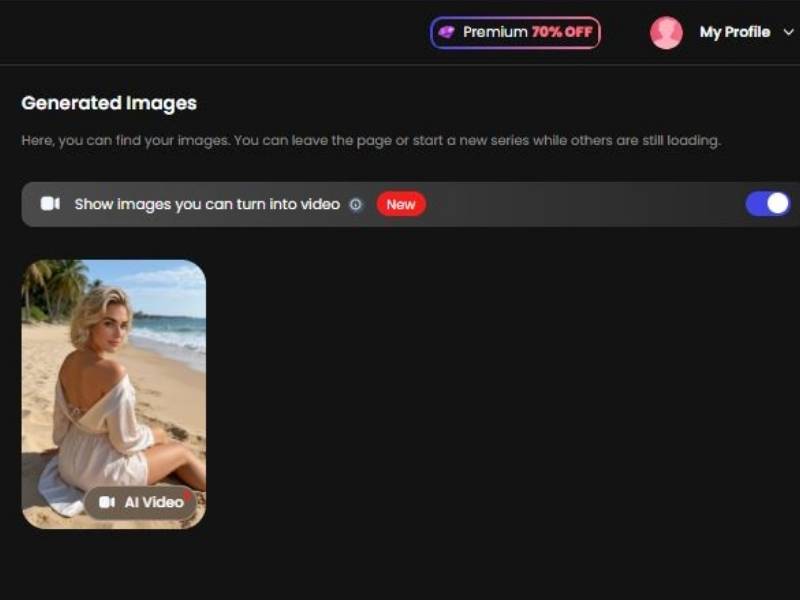
After generating, you land on Generated Images (your gallery).
What you can do here (features visible):
- Filter toggle: “Show images you can turn into video” with a New badge and an on/off switch to show only video-eligible images.
- Image tile controls: Each image card can display an AI Video button if it can be animated.
- Top bar items:
- Premium 70% OFF banner (upgrade offer)
- My Profile dropdown (account/menu access)
Action: Turn on the “turn into video” filter if needed → pick your best image → click AI Video.
Step 3 – Configure Video Settings and Request the Video
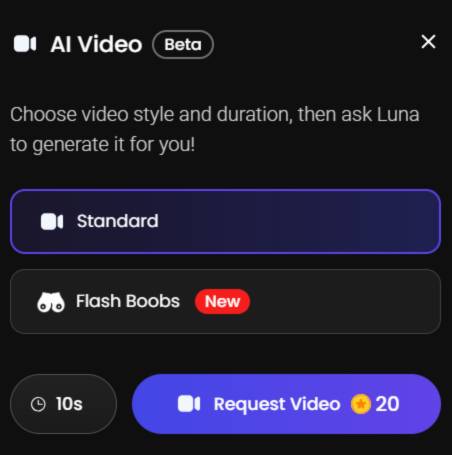
Clicking AI Video opens the AI Video (Beta) modal.
What you can do here (features visible):
- Video style selection: Choose one style (e.g., Standard). Another option is shown as New.
- Duration control: A 10s duration selector (10 seconds displayed).
- Request button + cost: Request Video with a visible cost of 20 credits.
- Close control: X in the top-right to exit the modal.
Action: Select style → confirm 10s → click Request Video (20 credits).
NSFW Content: What You Can and Can’t Really Do
Let’s be candid: people talk about Candy AI in the context of adult content, and reviews confirm it leans into NSFW interactions more than most mainstream chatbots.
Some users even say it’s among the better options if you’re after uncensored adult chats, images or videos.
But here’s the catch:
Candy AI still has policies that ban certain kinds of explicit content, especially anything that involves real people without consent, minors, or illegal material.
Their community guidelines are explicit about no sharing or creation of non-consensual intimate imagery or anything involving underage individuals.
So yeah – you can explore adult themes, but you’re not on a lawless safari. You’ll still run into moderation and safety checks.
How It Works in Practice
Users generally report:
- NSFW chat isn’t blocked – it’s part of the platform
- You can request images and videos with erotic themes within allowed bounds
- There’s some censorship if prompts get too sketchy or violate policy
- Video generation exists but feels tied to the character story context rather than freeform explicit video creation
Here’s a quick breakdown:
| Feature | NSFW-Friendly? | Notes |
| NSFW text chat | Yes | Characters respond playfully to adult prompts |
| AI image generation | Yes | Often realistic and customizable |
| Video generation | Yes (in context) | Integrated into the character experience, not a separate freeform generator |
| Uncensored freedom | No | Hard limits around consent, minors, certain explicit imagery |
| Custom characters | Yes | Build personalities that align with adult themes |
Why People Use It (and Why You Might Want To)
I won’t mince words – over the years I’ve seen AI tools that claim to have adult features and then do nothing.
Candy AI is actually used by people specifically for flirting, NSFW roleplay, and even erotic imaginations – at least according to user testimonials around the web. That alone makes it worth a look if this style of experience is your jam.
People rave about:
- Characters that feel “alive” or attentive
- Customization options (voice, look, personality)
- Integration of images, text, and video
- A community that shares tips and guides
They also grumble about:
- Occasional censorship where you’d least expect it
- Some AI responses feeling repetitive or shallow
- The need for tokens/tokens spending if you go deeper
Think of it as an interactive experience, not a toolbox video maker. You’re not just typing a prompt and getting a video clip – you’re shaping a relationship and coaxing media out of that bond.
How the Video Generation Fits In
Candy AI’s video generation feels like a natural extension of the character narrative, not a standalone NSFW Hollywood-style generator.
You ask your AI companion to appear in a scene, describe the setting, maybe give it a little storyline, and the platform stitches together something visual for you.
People report this can feel surprisingly immersive once you get the hang of leading the narrative instead of just “demanding a video.”
No joke – I’ve spent time on other video AI tools that spit out quivering, lifeless clips. Candy’s videos aren’t Spielberg by any stretch, but because they’re tied to your dialogue and the character’s personality, they feel more personal.
Safety, Moderation, and the Real-World Bit
Let’s talk about real-world limits for a second. You might see community members online say “free reign” or “uncensored,” but that’s not the full picture. There are clear exclusions, especially around:
- Non-consensual content
- Resemblance to real people
- Anything involving children or illegal acts
So, if your goal is to dance on the line of what’s forbidden, you’ll hit guardrails. That’s not Candy trying to be a buzzkill – it’s legal reality.
Final Word (Personal Take)
And if you’re someone who’s intrigued by AI as the sexy sidekick, this thing ain’t no lame chatbot with a “wink” sticker slapped on it.
It really integrates storytelling, voice, image and video in ways that - for good and bad – feel even more personal and interactive.
There won’t be a “make porn video” copy-paste button, but there will be space to make characters and immerse them in adult narratives, coax out custom images and videos as part of the courtship.
It’s like, dating a storybook character who also happens to be picking up on your cues – sometimes the delivery is smooth, sometimes there’s some roughness around the edges, but in most cases it’s waaaay more interesting than you’d expect if someone told you they were going go make an AI.
If you’re looking for something deep, substantive and a bit risqué – and if the platform’s rules and moderation sit well with you – Candy AI may be worth a test drive.