
Candy AI is your AI-powered companion for people who want to talk to a person instead of filling in a support ticket.
It mixes up chat-based A.I. with a customizable personality, flirtation, roleplay and emotional back-and-forth.
The objective isn’t productivity, or spreadsheets – it’s connection, entertainment and sometimes just killing loneliness at 2 a.m. when your group chat is asleep.
Is it the new way of getting away with never actually interacting with other humans? No.
Is it an attempt to make AI less stiff and more human? Absolutely.
A comprehensive guide of how to use Candy AI
Step 1 – Choose your AI Girl type (Realistic vs Anime) + Gender tab
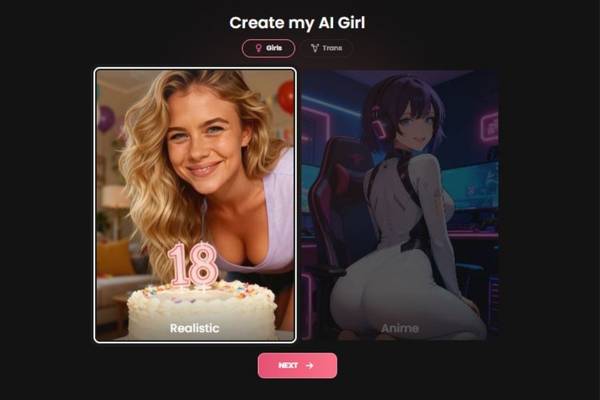
What you see
- Title: “Create my AI Girl”
- A top toggle with two labels:
- Girls (selected in your screenshot)
- Trans (an alternative category)
- Two big style cards:
- Realistic (left) – photo-real look
- Anime (right) – illustrated/anime look
- A pink NEXT button at the bottom.
What to do
- Pick a category at the top:
- Leave Girls selected, or switch to Trans if that’s what you want to generate.
- Pick a visual style:
- Tap Realistic for photo-like images.
- Tap Anime for a stylized character look.
- Click NEXT to continue.
Tip: If you want the character to look more like a real person in generated images, start with Realistic.
Step 2 – Choose Ethnicity + Age
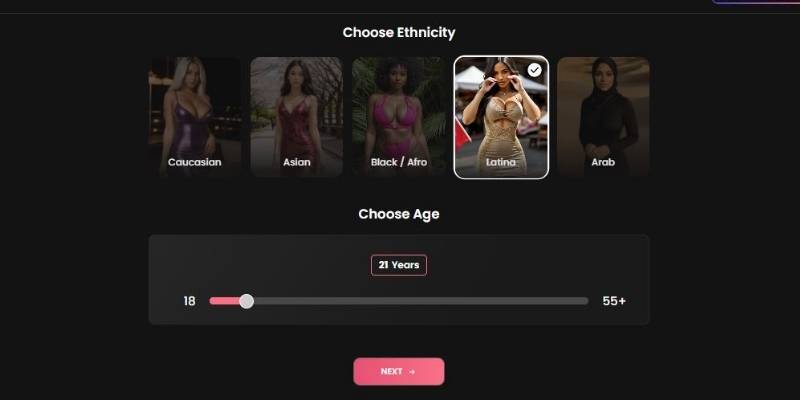
What you see
- Section header: “Choose Ethnicity”
- Ethnicity option tiles:
- Caucasian
- Asian
- Black / Afro
- Latina (selected in your screenshot)
- Arab
- Section header: “Choose Age”
- A horizontal age slider:
- Left end shows 18
- Right end shows 55+
- A floating label above the slider shows the current selection (example shown: “21 Years”)
- Pink NEXT button.
What to do
- Select an ethnicity by clicking one of the tiles.
- Set the age using the slider:
- Drag left/right until the label shows the age you want.
- Keep it 18+, especially if you’re using romantic/sexual themes later.
- Click NEXT.
Tip: If you care about consistency in later images, decide age now and keep it stable (changing it later can affect how the model renders the face/body).
Step 3 – Choose Hair Style, Hair Color, Eye Color

What you see
Three stacked customization sections:
- Choose Hair Style
- Options displayed: Straight, Bangs, Curly, Bun, Short (selected), Ponytail
- Choose Hair Color
- Options displayed: Brunette (selected), Blonde, Black, Redhead, Pink
- Choose Eye Color
- Options displayed: Brown (selected), Blue, Green
- Bottom pink button: NEXT
What to do
- Tap a Hair Style tile (e.g., Short, Curly, Ponytail).
- Tap a Hair Color tile (e.g., Brunette, Blonde).
- Tap an Eye Color tile (Brown/Blue/Green).
- Click NEXT.
Tip: If you’re aiming for a recognizable “character identity,” lock in hair + eyes early and avoid changing them later.
Step 4 – Choose Body Type + Breast Size (appearance presets)
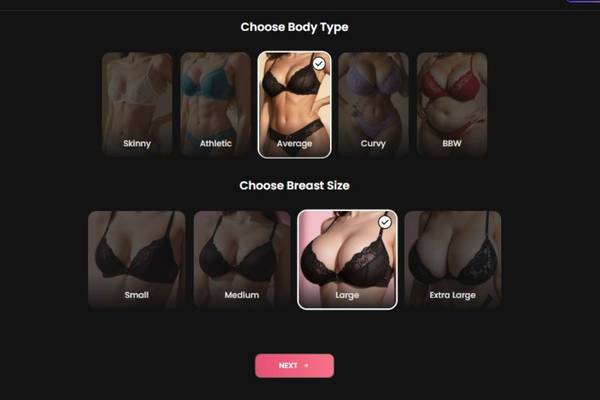
What you see
Two stacked sections:
- Choose Body Type
- Options: Skinny, Athletic, Average (selected), Curvy, BBW
- Choose Breast Size
- Options: Small, Medium, Large (selected), Extra Large
- Bottom pink NEXT button
What to do
- Select a Body Type tile.
- Select a Breast Size tile.
- Click NEXT.
Tip: Think of these as preset sliders that influence how the generator renders the character’s silhouette in images.
Step 5 – Name + Personality, Relationship, Occupation, Voice, and “Kinks”
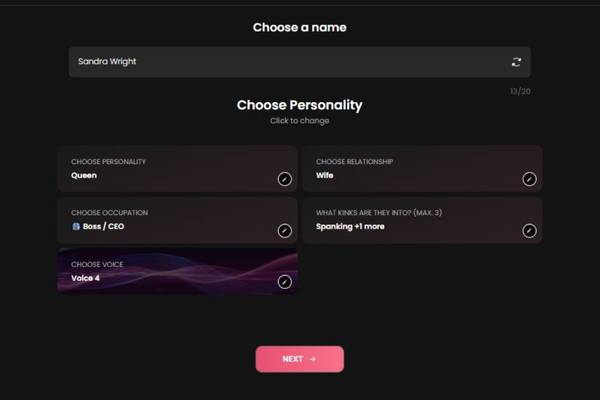
What you see
- Header: “Choose a name”
- A name input field showing “Sandra Wright”
- On the far right of the name field there’s a shuffle/refresh-style icon (suggests randomize/regenerate name).
- Header: “Choose Personality” with subtext “Click to change”
- Several selectable setting cards (each has a small edit icon on the right, like a pencil):
- Choose Personality: Queen
- Choose Relationship: Wife
- Choose Occupation: Boss / CEO
- What kinks are they into? (max 3): Spanking +1 more
- Choose Voice: Voice 4
- A small progress indicator near the top right: “13/20” (likely characters used in the name field).
- Bottom pink NEXT button.
What to do
- Set the name
- Type directly into the name field to customize.
- Use the shuffle icon to generate a new random name.
- Keep an eye on the character counter (e.g., 13/20) so you don’t exceed the name limit.
- Configure personality & role
- Tap any row (or the edit icon) to open its chooser.
- Set:
- Personality (e.g., “Queen” suggests confident/dominant vibes)
- Relationship (e.g., Wife)
- Occupation (e.g., Boss/CEO)
- Voice (e.g., Voice 4, likely changes tone/accent/style)
- Choose “Kinks” (optional)
- The UI explicitly says max 3.
- Select up to three preferences.
- If you use romantic/sexual preferences, again: keep age 18+.
- Click NEXT to finalize.
Tip: If you want a more “story-driven” companion, pick Personality + Occupation that match (e.g., “Queen” + “Boss/CEO” is consistent).
Step 6 – Final Review: Appearance vs Character + “Bring my AI to life”

What you see
- A final profile screen with:
- Left: a large preview image of the generated character.
- Right: profile header showing Name and age (example: “Sandra Wright, 21”)
- A row beneath with Relationship shown (example: Wife), plus small icons (one looks like an info/profile icon; another resembles an audio/speaker control).
- Two tabs near the top of the details panel:
- Appearance
- Character (selected in your screenshot)
- Detail cards showing your selections:
- Name: Sandra Wright
- Personality: Queen
- Relationship: Wife
- Occupation: Boss / CEO
- Kinks: Spanking +1 more
- Voice: Voice 4
- A large pink button: “BRING MY AI TO LIFE”
What to do
- Review everything
- Use the Appearance tab to verify physical traits (based on earlier steps).
- Use the Character tab to verify identity/personality settings (name, voice, etc.).
- Make sure it’s what you want
- If the app allows going back, this is the moment to fix mismatches (e.g., hair color not matching vibe).
- Click BRING MY AI TO LIFE
- This typically means the generator will create the final companion profile and move you into the chat/interaction experience (or start rendering the full character).
Tip: If “Voice” matters most to you (tone, style), don’t skip testing/previewing it if the speaker icon provides a sample.
Pros and Cons
Nothing is perfect. Candy AI included. Here’s the good, the bad, and the “eh, depends how you use it.”
Pros
| What works | Why it matters |
| Highly customizable AI characters | You’re not stuck with one bland personality |
| Natural-feeling dialogue | Conversations don’t feel like scripted chatbot loops |
| Emotional and flirtatious tone | It responds to how you speak, not just what you say |
| Fast responses | No awkward waiting around |
| Private, judgment-free space | Say weird things. It doesn’t blink |
Cons
| What might annoy you | Honest take |
| Paywall for advanced features | Free tier is more of a teaser |
| Can get repetitive over time | Long-term users may notice patterns |
| Not built for deep factual tasks | This is not your research assistant |
| Emotional dependency risk | Easy to overuse if you’re not self-aware |
How does it work?
“Fundamentally, Candy AI relies on big language models that are trained to optimize for flow of conversation, emotional mirroring and consistency of personality.” But that’s the boring technical explanation.
The real experience is simpler:
You select (or create) a character, set preferences – balance of tone and personality traits and boundaries – and then you talk.
The AI learns and adjusts to you. Sarcastic? It gets snarky. Soft-spoken? It dials things down. Pushy? It pushes back (sometimes).
It’s not so much like typing in commands; it’s more akin to directing a conversation - at times gently, then occasionally airbag with reckless abandon.
Core Functionalities
Candy AI isn’t overloaded with features, and that’s intentional. It focuses on doing a few things well instead of everything poorly.
| Functionality | Description |
| AI Chat Companions | Persistent characters with memory-like behavior |
| Personality Customization | Control attitude, mood, and interaction style |
| Roleplay Mode | From casual flirting to structured scenarios |
| Emotional Responsiveness | Reacts to tone, pacing, and sentiment |
| Content Filters | Adjustable boundaries for comfort levels |
This isn’t about tools-it’s about vibe. If you’re expecting dashboards and analytics, you’re in the wrong neighborhood.
Key Features
- Character Creation That Actually Matters
You’re not just choosing a name and avatar. Personality sliders and prompts genuinely affect how the AI responds. Change the temperament, and the conversation shifts—sometimes subtly, sometimes dramatically.
- Conversations That Breathe
Candy AI does pauses, follow-ups, and callbacks surprisingly well. It doesn’t always rush to reply with walls of text. Sometimes it asks questions back. Sometimes it hesitates. That imperfection helps.
- Memory-Style Continuity
While it’s not true long-term memory, Candy AI does reference past parts of the conversation in a way that feels intentional. It’s not flawless, but it’s better than the usual “Who are you again?” problem.
- Adult-Oriented Interaction (Optional)
This is clearly one of its selling points. The platform doesn’t pretend otherwise. The controls are there, and if that’s your thing, it leans in-without forcing it on everyone.
My Verdict
Candy AI isn’t life-changing. No, it’s not a replacement for human relationships and - really, let’s say it outright – it shouldn’t try to be. But as a companion-style AI? It really is quite good for what it tries to be.
And the thing I like best is that it doesn’t feel preachy or overly polite or robotic. It lets conversations wander.
Sometimes they get silly. Sometimes they get personal. Sometimes they just… exist. That alone makes it better than most of the AI-driven, chat-based tools that just seem like customer service bots in disguise.
Would I recommend it?
Yes - if you understand what you’re getting into.
If you crave something emotional, some flirty chatting and a little escape, then Candy AI has got you covered. For accuracy, productivity or deep knowledge retrieval – look elsewhere.
Used casually, it’s fun. When used thoughtfully, it can actually be oddly comforting. Used obsessively? That’s the user, not the tool.
FAQs
Is Candy AI free to use?
There’s a free version, but it’s limited. Think of it as a sample platter. Full access requires a paid plan.
Is it safe and private?
Conversations are private within the platform, but like any AI service, you shouldn’t share sensitive personal data. Common sense still applies.
Can I customize multiple characters?
Yes. You can create and interact with multiple AI personalities, each with different traits and interaction styles.
Is Candy AI suitable for everyone?
Not really. It’s clearly designed for adults and people comfortable with emotional or flirtatious AI interaction.
Will it replace real relationships?
No-and it shouldn’t. It works best as entertainment or light emotional support, not a substitute for human connection.