Candy AI, at its core, is an A.I. friend and an image generator; you pick or create characters and then ask the system to generate images of them and talk with you.
It’s like a playground for visual ideas on top of an interactive AI persona. The product is pitched as a place for more intimate adult play, not just your vanilla selfies – but with some control.
NSFW Image Generation – The Core Experience
If we just cut the sugar: This is where it gets interesting.
The NSFW bit is not so much a vanilla “make an image” tool. It’s structured so that you can make adult-oriented images of characters in the game we call friends - whether they’re 2D anime-style, semi-real or otherwise.
Judging from the prompts I’ve stumbled onto, Candy AI advertisies visual freedom without blanket censorship like you see on most mainstream generators (provided you stay within site’s adult-only terms and age checks).
It’s not as if you’re hacking around filters or bodge-tweaking prompts; the platform endorses it as part of what it provides.
Here’s a glance at what the NSFW generator supports:
| Feature | What It Does |
| Custom Characters | You can design looks/traits first – body type, clothing (or lack thereof), art style. |
| Multiple Styles | Realistic photos, stylized anime, and more – all from text prompts. |
| Prompt-Based Control | You tell it what you want (within terms) and it creates imagery from that. |
| Roleplay + Image Combo | Characters can chat with you too, not just generate pics – a mixed media experience. |
That combination of text + visuals is what makes Candy AIs feel more like “interactive fantasies” than just static art tools.
How to use Candy AI: Step-by-step guide
Step 1: Character Selection (Your Starting Point)
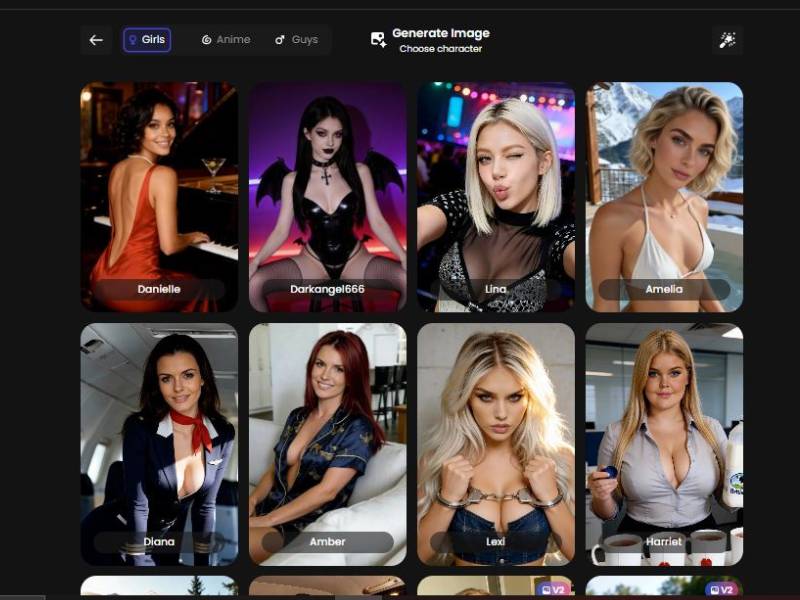
On the left side of the screen, the first thing you notice is a character card.
What you see here:
- A portrait image of a character (example shown: “Amelia Elise”)
- The character name displayed clearly
- A small icon on the portrait indicating character settings/edit options
- A “V2” badge on some characters, suggesting updated or improved character versions
What this step does:
This character acts as the visual foundation for every image you generate. The face, general appearance, and aesthetic style are locked in here.
You’re not starting from scratch every time – you’re working with a consistent character identity.
Think of it like casting an actor before directing a scene.
Once the character is selected, everything else (outfit, pose, environment) builds on top of that.
Step 2: Prompt Writing & Image Description (The Creative Core)
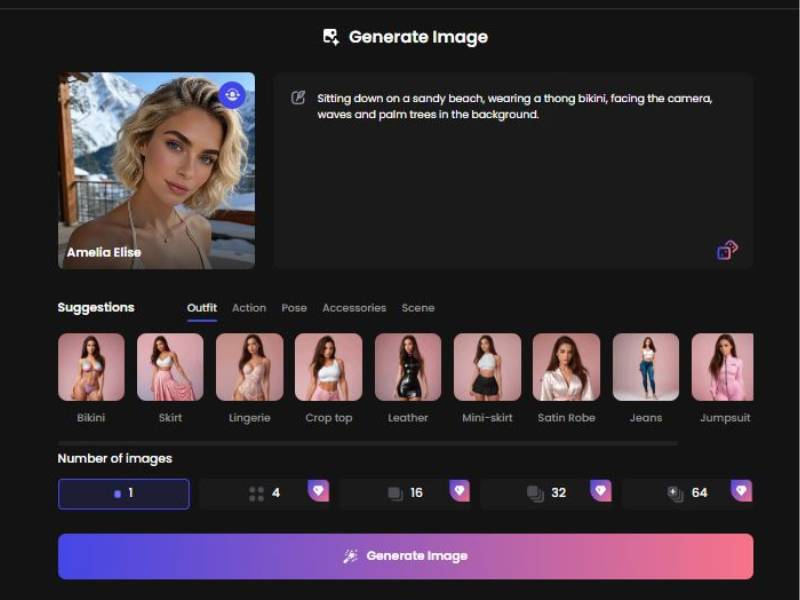
To the right of the character card is the main text prompt box.
Prompt Box Features:
- Large editable text area
- Pre-filled example descriptions (helpful if you don’t know where to start)
- A small lock icon (indicates saved or protected prompts)
What goes here:
This is where you describe:
- What the character is doing
- Where the scene takes place
- Clothing, mood, angle, and visual tone
Example from the interface:
“Sitting down on a sandy beach, wearing a thong bikini, facing the camera, waves and palm trees in the background…”
You don’t need perfect grammar. Short phrases work. The generator is clearly optimized for plain language descriptions, not technical prompt engineering.
Step 3: Visual Suggestions & Custom Controls
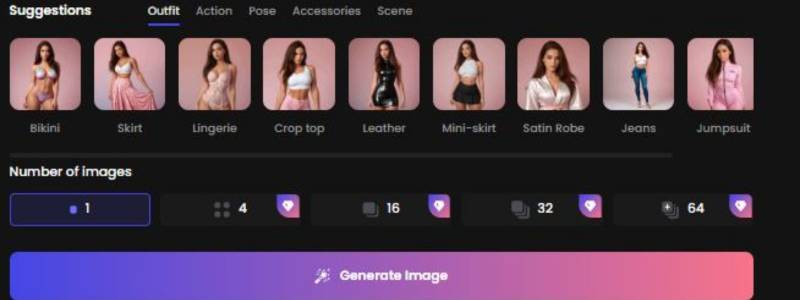
Directly below the prompt box is a tabbed customization panel. This is where the generator becomes beginner-friendly.
Tabs visible in the interface:
- Suggestions
- Outfit
- Action
- Pose
- Accessories
- Scene
Each tab visually suggests options instead of forcing you to type everything manually.
Outfit Tab (Most Used Feature)
Under the Outfit tab, you see clickable visual tiles such as:
- Bikini
- Skirt
- Lingerie
- Crop top
- Leather
- Mini-skirt
- Satin robe
- Jeans
- Jumpsuit
Clicking one of these:
- Automatically influences the generated image
- Helps shape the result even if your text prompt is vague
This is especially useful if you’re thinking “I know what vibe I want, I just don’t know how to phrase it.”
Suggestions Tab (Quick Start Mode)
This tab shows pre-made visual ideas. It’s ideal for:
- First-time users
- Anyone experimenting without a clear plan
- Rapid image generation
Instead of describing everything, you let the UI guide the image direction.
Action, Pose, Accessories & Scene Tabs
While not expanded in detail in the screenshots, their purpose is obvious from the layout:
| Tab | Purpose |
| Action | What the character is doing |
| Pose | Body position and camera angle |
| Accessories | Add-ons like clothing details or extras |
| Scene | Background and environment |
These tabs reduce prompt friction and prevent mistakes.
So What’s It Like to Use This Thing?
If you’re the type of person who has tested out AI image generators that stick to boring ol’ vanilla, and thought “OK, but where’s the spicy stuff?” – Candy AI is really well-poised to fill that void.
The sentiment of many user impressions and reviews is that it’s more of a playground for uncensored creativity than mainstream platforms that are constantly tightening the noose around NSFW content.
But remember this is not just somewhere to mash “generate” and hope for the best. You want to craft prompts, play with character settings, and see what comes out the other side.
One thing that struck me: Users are not just creating characters – they’re combining these into conversations and visual prompts to create a sort of hybrid experience. That’s certainly something that many other standalone image tools don’t provide.
Here’s the candid part: Some people love that all-in, mixtape approach; others consider it a little gimmicky. Where you fall depends on what you want to get out of it.
Tokens & Payments – The Reality Check
Candy AI isn’t totally free in the long run. You’ll likely start with some free tries, but the better image generation features (especially higher-resolution or multiple-image batches) typically sit behind a credit/token system or premium access. That’s part of how the platform operates – much like other “freemium” AI services.
So, if you’re planning to go deep and generate a lot of custom content, budget for some premium tokens.
Safety, Privacy & Limits
While the platform markets itself to adults and has age gating, there are a few things I want you to think about before you get too carried away:
- Private isn’t always secure – even if a site says conversations and images stay private, your content is still handled by their servers. Take your own privacy seriously.
- Terms apply – everything you generate must comply with Candy AI’s terms; they do moderate or block illegal content.
- Creative ownership – the images you generate belong in a mixed-use sense (platform rights often apply), so don’t assume full ownership.
This isn’t to scare you, just to nudge you into thinking before clicking “generate.”
My Personal Take (No Botspeak Here)
I’ll be blunt: this is not your dad’s image generator with a “safe for work” filter slapped on. It feels like the creators intended for adult creative exploration to be part of the experience – which is why you don’t get the heavy hand of censorship that other AI art platforms shove at you.
That’s cool if you’re someone who’s curious about creating character-based visuals with personality, mood, and context – and even more fun if you like that interactive twist where a character can respond to you after you generate an image.
But it’s not a magic wand. You have to think, tinker, and play with prompts – experience improves with practice.
If I had to compare it to something, it’s like going from drawing stick figures with a generic tool to suddenly having access to an art studio where you can decide wardrobe, pose, lighting – and then chat with the character afterward. For some people that is wild and fun; for others, it’s just extra fluff.
Final Verdict
Candy AI’s NSFW image generation is:
- Capable of producing a wide range of adult-oriented imagery based on your descriptions.
- Flexible across styles from realistic to anime.
- Interactive, blending visuals with chat and character creation.
- Not free forever, with premium tokens unlocking the best experiences.
If that sounds like your kind of playground – and you approach it with curiosity and creative prompts – trying it out could be a pretty interesting ride.