So let’s start this off with a really easy question: Have you ever wished to make your fantasy idea come true in an image (any image, Google doesn’t judge!) Exactly like you thought it up – without having to fight an awkward user interface, or dull ass presets, or the content police? Because that’s the basic promise here.
Mydreamcompanion’s NSFW image generator doesn’t even pretend not to be adult-oriented. A home page whose pull-quote, literally, is the invitation to “unleash your imagination” and create “compelling NSFW art pieces” on a prompt of your own choosing.
You basically get a text prompt box, some style presets, and options for number of images and level of quality. Toss in all the craziest things you can think of – whispering seductive tones, hard-core erotic scenes, anime-like adult art work – and press Generate. The A.I. then transforms that prompt into visuals in mere seconds.
But before you get too hyped, allow me to personal shade some bits of it and cheerlead others.
A comprehensive guide of how to use Mydreamcompanion Image Generator
Step 1 – Enter the Image Creation Workspace
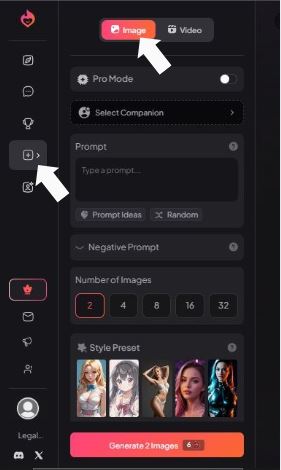
From the left sidebar, select the image generation section. At the top of the main panel, confirm Image (not Video) is active.
What this does
- Locks the workflow into still-image creation.
- Ensures all downstream options (style, prompt, quality) apply to images only.
Tip
If you accidentally switch to Video, the prompt logic and output expectations change. Stay on Image for girlfriend portraits.
Step 2 – Choose a Companion Profile
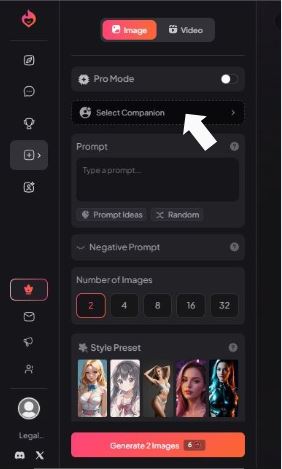
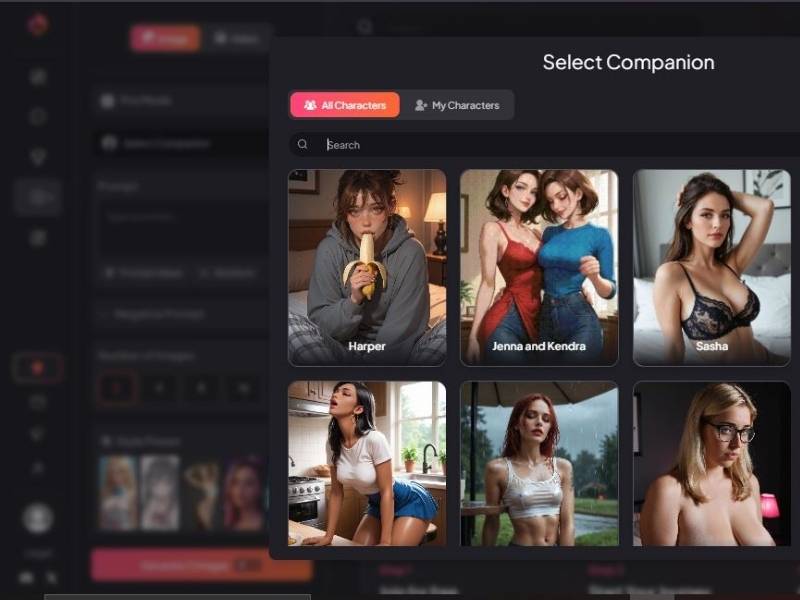
Open Select Companion and pick the character profile you want to build visuals for.
What this does
Anchors your images to a specific character identity.
- Helps maintain facial consistency across generations.
- Applies any predefined attributes tied to that companion.
Why it matters
Skipping this step often leads to inconsistent faces. Selecting a companion first gives the generator a “memory” to work with.
Step 3 – Write the Core Prompt
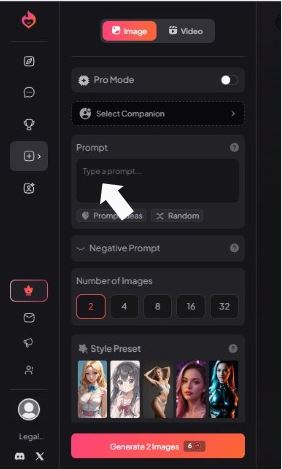
In the Prompt field, describe your AI girlfriend clearly.
What to include
- Physical traits (hair, eyes, body type)
- Mood or expression
- Outfit or style
- Scene or background
- Camera vibe (portrait, close-up, cinematic, etc.)
Built-in helpers
- Prompt Ideas offers inspiration if you’re stuck.
- Random generates a surprise prompt for experimentation.
Practical advice
Write like you’re explaining the image to a friend who can’t see it yet. Clear beats clever.
Step 4 – Select Output Quantity
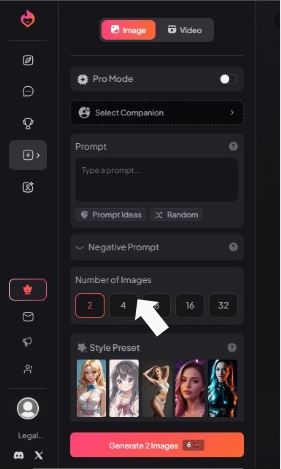
Choose how many images you want generated in one run: 2, 4, 8, 16, or 32.
How to decide
- Fewer images = faster results, lower cost.
- More images = better variety, more chances to nail the look.
Recommendation
Start with 2 or 4 while refining prompts. Scale up once you’re confident.
Step 5 – Apply a Style Preset
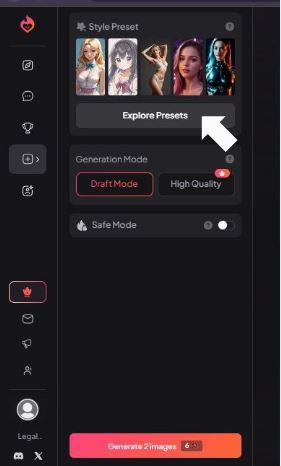
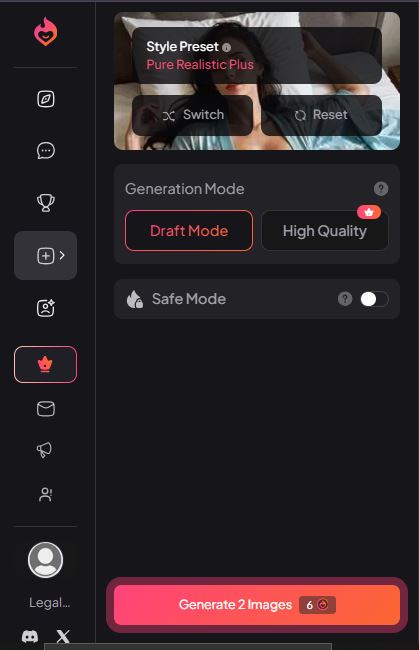
Under Style Preset, choose a visual direction or click Explore Presets for more options.
What presets control
- Art style (realistic, illustrated, anime-inspired)
- Lighting and color tone
- Facial rendering style
Workflow tip
Lock your style preset early. Changing it later can drastically alter how your companion looks.
Step 6 – Set Quality and Generate
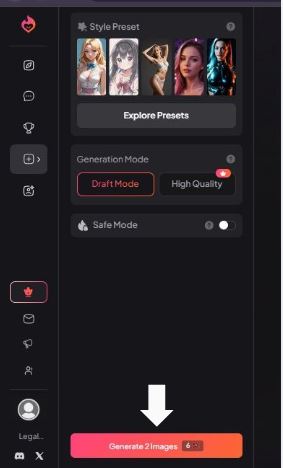
Choose between Draft Mode and High Quality, then press Generate.
Mode breakdown
| Mode | Best For | Notes |
| Draft Mode | Testing ideas | Faster, lighter detail |
| High Quality | Final images | Sharper, more refined |
Final check before generating
- Safe Mode: toggle off if you want unrestricted creative output.
- Image count correct?
- Prompt and negative prompt aligned?
Click Generate, and the system handles the rest.
What Works Pretty Well
I’m going to say straight up: for a tool that’s marketed explicitly for adult generation, there’s some solid innovation here.
Freedom of Expression
The generator doesn’t treat your adult requests like a dirty little secret. It’s designed to interpret pretty explicit prompts without crippling filters grabbing the steering wheel.
You’re not constantly being nudged back to sugar-coated PG-13 prompts – and that’s part of the draw if you genuinely want uncensored NSFW art.
Style Flexibility
One thing that surprised me: you can pivot between realistic, anime-styled, and other artistic directions – all in the same tool.
So if one day you want moody realism and the next you’re craving cartoon kink vibes, you’re not stuck picking a different service.
To make this more digestible, here’s a quick snapshot comparing some key bits:
| Attribute | What You Get |
| Prompt-to-Image Generation | Yes – write it, describe it, send it |
| NSFW / Adult Specific | Yes – built for explicit content |
| Style Options | Multiple – anime, realistic, artistic |
| Image Count Choices | 2, 4, 8, 16, 32 |
| Privacy | Claimed private (your images aren’t shared externally) |
| Ease of Use | Pretty simple, minimal setup |
| Free Usage | Yes, starts free before credits/paid tiers |
This is basically the fun table you’d tell your buddy as you’re describing it over drinks.
Intuitive Workflow
From what the site shows, you go through four steps:
- Sign up for free.
- Choose or define the companion you’re thinking about.
- Customize details (poses, art style, mood).
- Hit generate and download.
It’s the same pattern most text-to-image tools follow – but here the interface doesn’t feel like it’s afraid of mature art. That’s a big part of why people who are exploring NSFW generation like this one specifically.
What Might Trip You Up
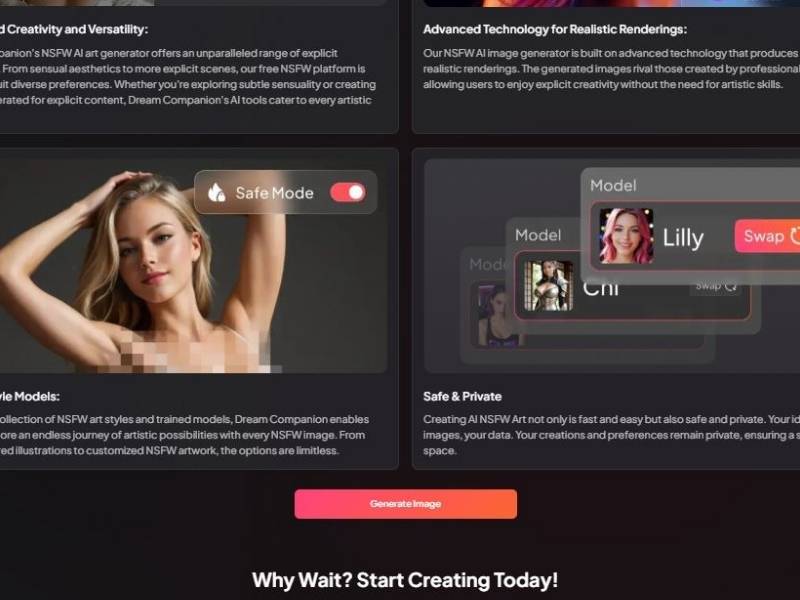
Let’s talk real – not everything here is top-tier perfection.
Quality Isn’t Always Museum-Level
Some folks who’ve tested features note that while images are decent and often pretty close to what you ask for, they can lack depth or have weird little AI quirks (like anatomy that’s just a bit «off» or backgrounds that look blurry).
That’s not unusual for most adult AI tools, but it’s worth mentioning if you’re comparing it with raws from big-name art generators.
Credits / Paid Tiers
The free tier will let you poke around and test prompts, but if you really want no limits or higher-resolution outputs, you’ll get nudged toward paid credits – similar to many other services. There’s no hiding that part.
Style Consistency Can Wobble
Sometimes one image in a batch vibes exactly with what you asked for, and the next looks like it’s got a different mood.
It’s not catastrophic, but don’t expect perfectly uniform series unless you spend some time fine-tuning your prompts.
Real Use Cases (Not Just Tech Talk)
Imagine this:
- You’ve built an AI companion – let’s say an anime-inspired character with a personality you like – and you want pictures that match her exact look and vibe.
- You’re in a storytelling mood and want visuals that go with the narrative you crafted in chat.
- You want to save, share, or keep a personal gallery that reflects your creative thought rather than stock imagery.
That’s the sweet spot where this generator doesn’t feel like a gimmick but instead something you’re excited to click back into.
Final Words – Would I Recommend It?
If you’re interested in NSFW image generation in general and want a tool that feels like it’s for that – not pulling punches around filters, not serving up sanitized versions when you want adult art – then sure, give it a test drive.
It’s not the sort of perfect art engine royalty that will outcompete human artists any time soon, but it’s playful and surprisingly nimble and mo – most important for a lot of people – it is clearly pointed toward uncensored creative activity.
Combine that with relatively easy access, the variety of styles it can support and the freedom to explore ideas and you have something that is legitimately fun to mess around with.