I had to hunt around a few pages just to get an idea, but one of the official pages for in-paint shows off some editor UI, and while more detailed descriptions of SoulGen make it clear that it is shorthand for being a text-to-image and image editing tool that content creators have been using to create all sorts of art, from stylistic images and anime designs, realistic imagery as well as adult-oriented pieces.
A comprehensive guide of how to use Soulgen AI Image Maker
Step 1: Upload your image
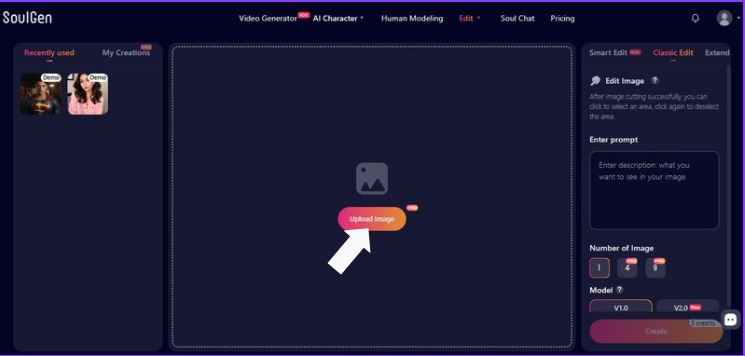
Where to look
- The center canvas (big dashed rectangle) is your workspace.
- There’s a thumbnail icon in the middle and a button that says Upload image.
What to do
- Click Upload image.
- Pick a file from your device.
- Wait for it to load into the canvas.
What else is on screen (useful stuff)
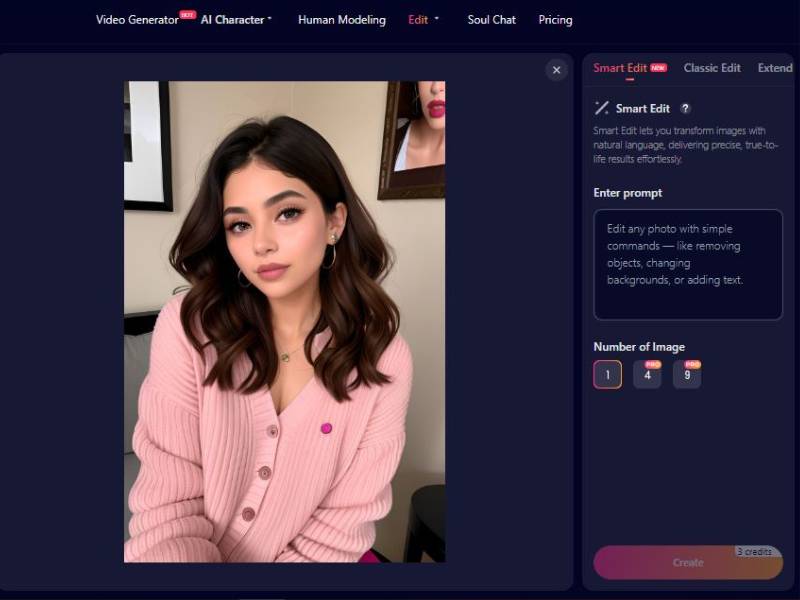
- Top navigation bar: Video Generator, AI Character, Human Modeling, Edit (you’re here), Soul Chat, Pricing.
- Left sidebar:
- Recently used (quick access to past items)
- My Creations (your generated results library)
Tip: If you’re editing a face/character, start with a high-quality, well-lit image. Garbage in, chaos out.
Step 2: Enter your prompt (the “what should it create?” step)
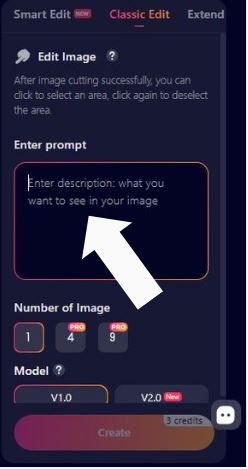
Where to type
Right panel → Enter prompt box.
The placeholder says: “Enter description: what you want to see in your image”.
How to write prompts that actually work
A good prompt usually has:
- Subject (who/what)
- Appearance (hair, outfit, style)
- Scene / lighting (studio light, sunset, soft daylight)
- Style (photorealistic, anime, cinematic, etc.)
- Detail boosters (high detail, shallow depth of field)
Example (like your screenshot):
- “soft daylight, cozy apartment background, cinematic lighting, ultra-detailed skin texture, shallow depth of field, photorealistic style”
Controls inside the prompt box
- A small X appears in the prompt field (in your “create image” screenshot). That’s typically a clear/reset control.
Tip: If results look “almost right,” don’t rewrite everything. Change one thing at a time (lighting OR hair OR outfit) so you can tell what fixed it.
Step 3: Choose the number of images to generate
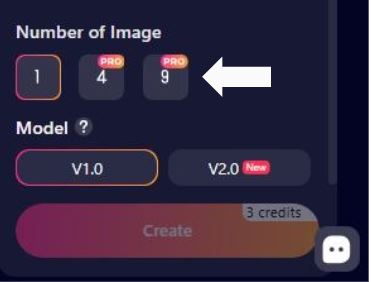
Where it is
Right panel → Number of Image
Options shown
- 1
- 4 (PRO)
- 9 (PRO)
So:
- Free/basic users can likely generate 1 at a time.
- 4 and 9 are marked PRO, meaning they require a paid plan or higher tier.
Practical advice
- Use 1 while dialing in prompts.
- Switch to 4 once you’ve got a solid prompt, because variations help you pick the best face, pose, and lighting.
Step 4: Pick the model (V1.0 vs V2.0)
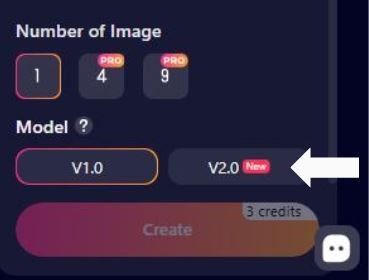
Model selection
Right panel → Model (there’s also a ? help icon here)
Options shown:
- V1.0
- V2.0 (New)
How to choose (simple rule of thumb)
- Start with V2.0 (New) when you want more modern results (often better coherence/detail).
- Try V1.0 if V2.0 is over-stylizing or ignoring something you asked for.
Step 5: Generate Image/s
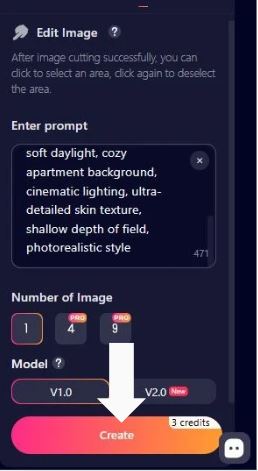
Credits + Create button
At the bottom:
- A big gradient Create button.
- It shows the cost: “3 credits” (visible near the button area).
What to do
- Confirm:
- Image uploaded
- Area selected (if you’re editing only part)
- Prompt entered
- Number of images chosen
- Model chosen
- Click Create.
- Wait for results.
- Check My Creations (left sidebar) to revisit outputs.
So what’s the deal with NSFW?
A few of the third-party posts claim SoulGen is a way to generate NSFW art: You can input prompts and make edits so it creates art that’s “not safe for work” or adult-themed.
Others discuss it in the framework of broader NSFW video and image AI tools, where SoulGen is usually name-dropped with websites that are specifically designed to produce that type of output.
But here’s the real twist:
People’s experiences vary. Some Redditors have complained that the explicit content is actually censored or blurred and not everything that users want to see will be created by the system – likely because safety filters are blocking some things. That’s a good thing to know if you want to experiment with this.
What You Can Expect: Honest Features & Reality Check
Let’s lay it out in a way that’s easy to digest – not all marketing hype, not all fanboy talk, but the real pros/cons as described in community posts, reviews, and tool summaries:
Quick Feature Table – What It Claims to Do
| Feature | How It Helps You | Notes / Reality |
| Text-to-Image Generation | Write a prompt and get an image | Works well for general art; NSFW support varies and may be restricted by filters. |
| Image Editing / In-painting | Remove, add, reshape parts of an image | Useful for creative tweaks – not guaranteed to break safety filters. |
| Face Swap / Custom Characters | Upload a photo and morph it into new creations | Powerful for stylized work; ethical use strongly encouraged. |
| NSFW Content Generation | Create adult-themed art | Reported by third parties but actual output sometimes blocked or filtered. |
First-Person Take (Yeah, I’ve Read Through a Lot of This Stuff)
When I looked at the site and surrounding talk, I had that curious, “can it really do this?” feeling – like when you hear a rumor that a software can do everything, and then you actually kick the tires.
You do get a tool that’s intuitive – text box, choose model, preview, generate – standard modern AI art flow. People who enjoy playing with AI art tend to like that simplicity.
But then reality bites a bit: several folks online have said the explicit output isn’t as open-ended as you might hope, at least not without workarounds people don’t always share. That tells you two things:
- There is demand for NSFW generation features (hence all the chatter online).
- The platform may moderate what it lets you create to stay within legal/safety norms.
That kind of push-pull is common in AI tools that could create adult art – creators want freedom, platforms want to avoid legal trouble. It isn’t as simple as “type it and get it”.
Not Just Another Generator – The Human Side
Listen: folks use creative tools for all kinds of reasons. Some are strictly art-based, some are playful, some push at borders.
And when sites like SoulGen get mired in NSFW speech, and tech giants throw up their hands at how to rein it in, that’s not just a technology story – that’s human emotion, ethics, regulation, desire for expression all lashed together.
When you read glowing lists of features, you may get hyped up, impatient, even a little skeptical.
That’s normal. But anyone who tells you a tool like this is a magic wand is either overselling it or hasn’t actually used it under real-world limitations.
So if you try it – approach with curiosity, not entitlement. Expect some cool artistic power. Expect some guardrails. And certainly expect 1that what you would like to do with it may not be what in fact you can do with it.
Practical Tips If You’re Thinking of Trying It
| Tip | Why It Matters |
| Start with benign prompts first | Get comfortable with the UI, models, and editing options. |
| Pay attention to wording | Some filters may trigger based on specific keywords. |
| Respect ethical boundaries | Generating content involving identifiable real people without consent is both unethical and often illegal. |
| Check your local laws | Different countries have different stances on AI adult content. |
Final Thought – Should You Try It?
If you’re in it for creative exploration – anime characters, stylized art, toying with in-paint edits – SoulGen is easy enough to pick up and will likely delight.
If you’re hoping for unfiltered adult imagery in most people’s understanding of “NSFW generator,” then you’ll find mixed results and moderation – that’s just part of using a lot of online AI platforms now, not merely one tool.
Which is why reports from some users that it “doesn’t make the explicit stuff like they thought it would” are something to consider, too.